This is an independent fan-made website and is not affiliated with, endorsed by, or operated by McDonald's Corporation. McDonald's®, the Golden Arches logo, and related trademarks are the property of their respective owners.

McDonald's Rewards: How to Earn, Redeem & Maximize Your Points (2026)
McDonald's Rewards: How to Earn, Redeem & Maximize Your Points (2026)

The McDonald's Rewards program is one of the easiest ways to earn free food simply by purchasing your favorite menu items. Whether you're ordering a Big Mac®, McChicken®, World Famous Fries®, or your morning coffee, every eligible purchase helps you collect points that can later be redeemed for free menu items.

Millions of customers use the McDonald's App to earn rewards on everyday purchases. Instead of letting your orders go unrewarded, the program allows you to accumulate points over time and exchange them for burgers, fries, drinks, breakfast items, desserts, and more.

If you’re new to McDonald’s Rewards or wondering how to earn points faster, redeem rewards, or maximize the value of every purchase, this guide covers everything you need to know.

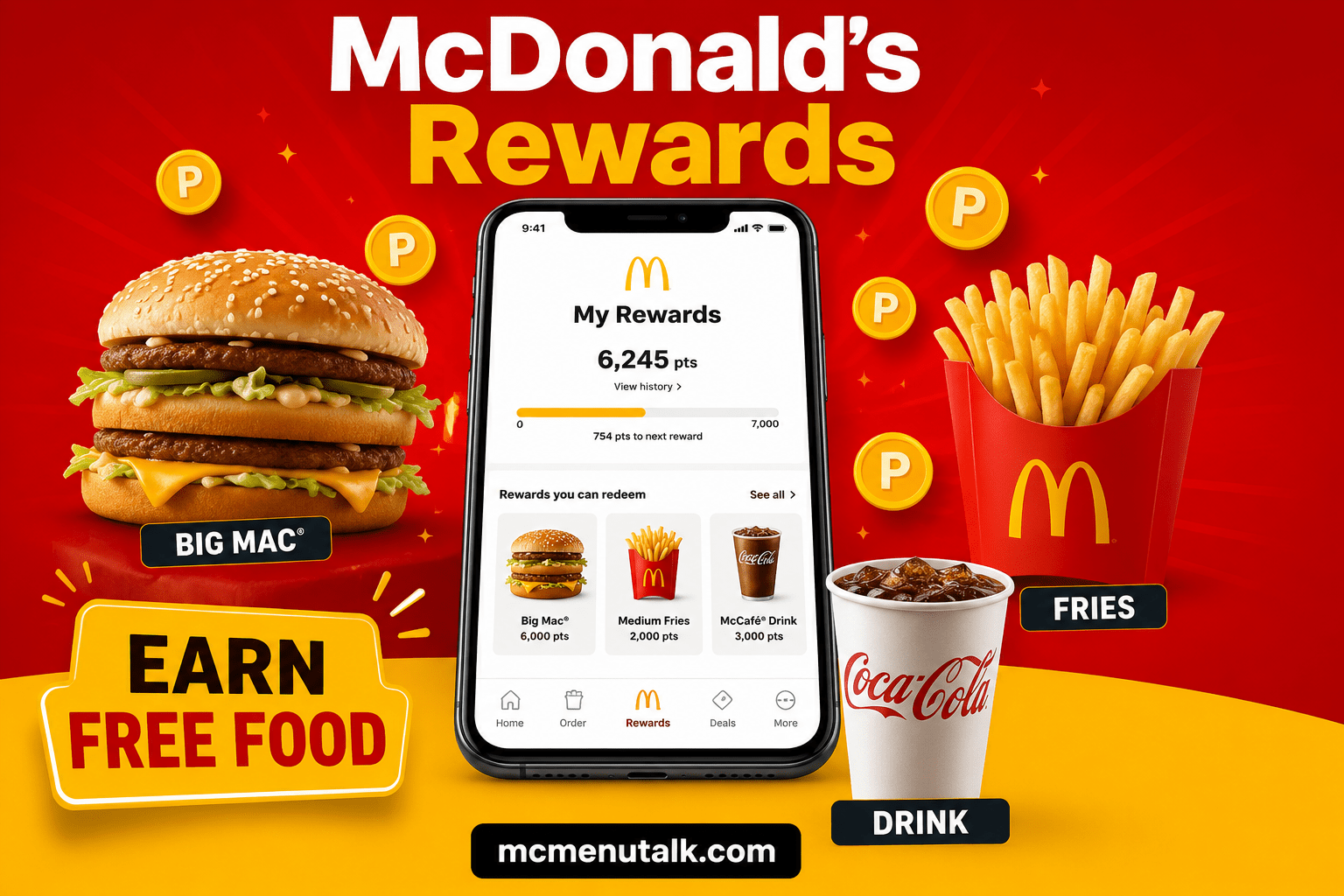
  • McDonald’s App
  • Rewards Points
  • Big Mac
  • Fries
  • Mobile Phone
  • “Earn Free Food”

McDonald's Rewards Overview

The McDonald's Rewards program is available through the official McDonald's mobile app. Once you create an account and join the program, you'll begin earning points on eligible purchases.

Unlike coupons or one-time promotions, Rewards is an ongoing loyalty program designed to reward repeat customers.

As your points balance grows, you can redeem them for free menu items directly through the app.


McDonald's Rewards at a Glance

McDonald's Rewards at a Glance
FeatureDetails
Program NameMcDonald's Rewards
Available ThroughMcDonald's App
Cost to JoinFree
Earn PointsYes
Redeem Free FoodYes
Mobile OrderingSupported
App RequiredUsually
Rewards ExpireYes (Varies)

How Does McDonald's Rewards Work?

How Does McDonald's Rewards Work?

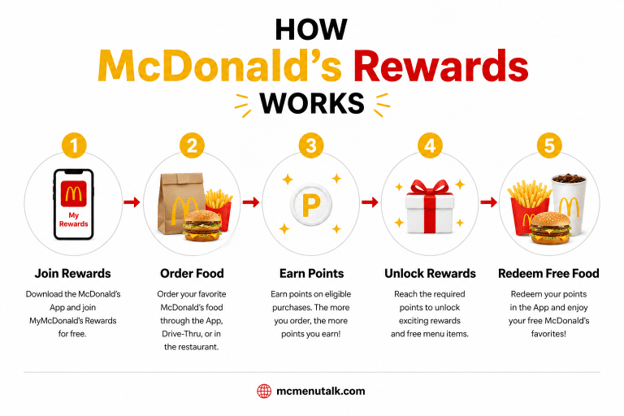
Using McDonald's Rewards is simple. Every eligible purchase earns points, and those points can later be exchanged for free menu items.

The process takes only a few minutes to set up and can save frequent customers money over time.


Step 1: Download the McDonald's App

Begin by downloading the official McDonald's App on your smartphone.

The app is available for both Android and iPhone devices.

Once installed, create your free McDonald's account.


Step 2: Join McDonald's Rewards

After signing in, enroll in the Rewards program.

Joining is completely free and only takes a few seconds.

Once activated, your account will begin tracking eligible purchases.


Step 3: Order Your Favorite Menu Items

Purchase food using one of the eligible ordering methods.

Examples include:

  • Mobile Order
  • Drive-Thru
  • Counter Order
  • Kiosk
  • Pickup

Some delivery purchases may also qualify depending on your location.


Step 4: Earn Rewards Points

Every eligible purchase adds points to your account.

The more often you order, the more rewards you can unlock.

You can view your current points balance anytime inside the McDonald's App.


Step 5: Redeem Your Points

Once you've earned enough points, you can exchange them for free menu items.

Simply select an available reward inside the app before placing your order.


How to Earn McDonald's Rewards Points

There are several ways to earn Rewards Points through the McDonald's App.

Most qualifying purchases automatically earn points after your order is completed.


Eligible Ways to Earn Points

How Does McDonald's Rewards Work?
Purchase MethodEligible for Points
Mobile Order✅ Yes
Drive-Thru✅ Yes
Counter Order✅ Yes
Self-Service Kiosk✅ Yes
Pickup✅ Yes
Participating in Delivery OrdersSometimes

Ways to Earn Points Faster

Although every eligible purchase earns points, there are several ways to grow your balance more quickly.

Customers who regularly use the McDonald's App often receive exclusive promotions that increase the number of points earned.


Best Ways to Maximize Your Rewards

Ways to Earn Points Faster
TipBenefit
Order through the AppEnsures points are tracked automatically
Activate Bonus OffersEarn additional points
Participate in Limited-Time PromotionsFaster rewards
Check Weekly DealsExclusive point opportunities
Visit RegularlyBuild points consistently

McDonald's Rewards Menu

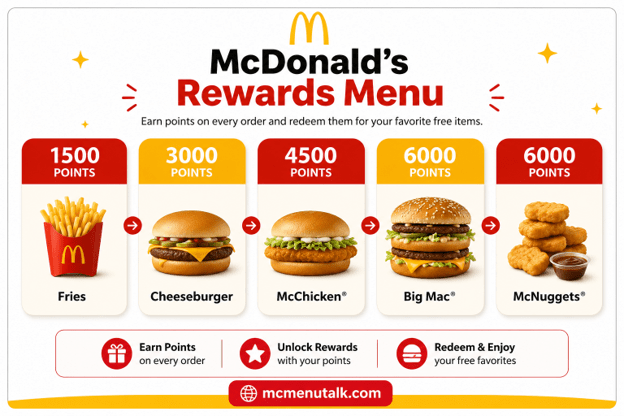
After earning enough points, you can exchange them for free food and drinks.

The available rewards may change depending on your country, region, or promotional period.

Below are examples of menu items commonly available through McDonald's Rewards.
McDonald's Rewards Menu

Best Rewards to Redeem

Best McDonald's Rewards to Redeem

Not every reward provides the same value.

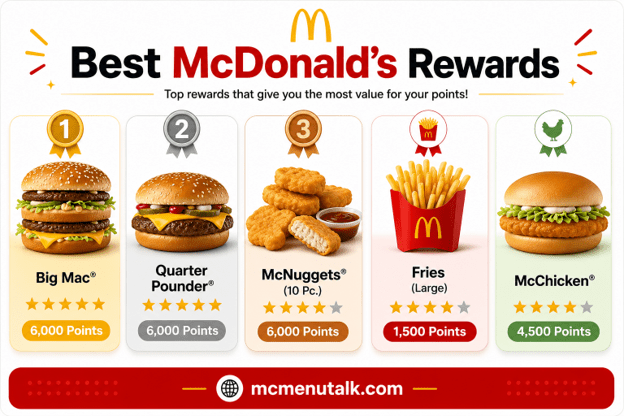
Some menu items offer significantly better value for the number of points required.

Customers who want to maximize their rewards often save points for premium burgers or larger menu items instead of smaller snacks.


Best Value Rewards

Best Rewards to Redeem
Menu ItemOverall Value
Big Mac⭐⭐⭐⭐⭐
Quarter Pounder with Cheese⭐⭐⭐⭐⭐
Chicken McNuggets⭐⭐⭐⭐
McChicken⭐⭐⭐⭐
Fries⭐⭐⭐⭐
Cheeseburger⭐⭐⭐
Vanilla Cone⭐⭐⭐

Why Join McDonald's Rewards?

Whether you visit McDonald's once a week or several times a month, Rewards provides additional value without any membership fee.

Instead of missing out on benefits, every eligible purchase helps you work toward your next free menu item.

Many customers also receive exclusive app-only offers, bonus point events, birthday promotions, and personalized deals throughout the year.

For regular McDonald's customers, joining Rewards is one of the easiest ways to save money while enjoying the menu you already love.


How to Redeem McDonald's Rewards Points

Redeeming your McDonald's Rewards Points is just as simple as earning them. Once you've accumulated enough points, you can exchange them for free menu items directly through the McDonald's App.

Before placing your order, browse the available rewards, choose your preferred item, and activate the reward. The discount or free item will be applied during checkout when you complete an eligible order.
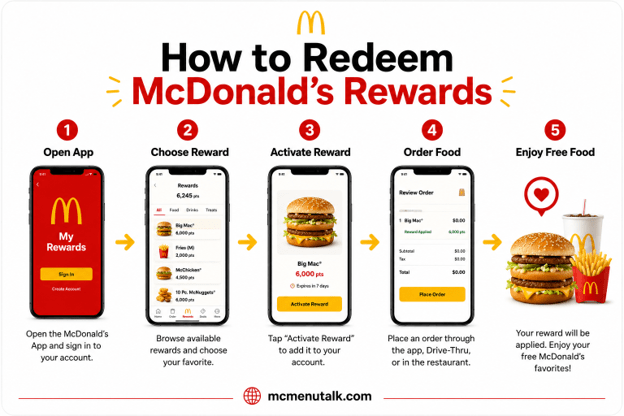
How to Redeem McDonald's Rewards Points

Step-by-Step Guide to Redeeming Rewards

Step 1

Open the McDonald's App.

Step 2

Sign in to your Rewards account.

Step 3

Navigate to the Rewards section.

Step 4

Browse available rewards.

Step 5

Choose the reward you'd like to redeem.

Step 6

Activate the reward.

Step 7

Place an eligible order.

Step 8

Enjoy your free menu item.


Rewards Redemption Process

Rewards Redemption Process
StepDescription
Open the AppLaunch the McDonald's App
Sign InAccess your Rewards account
Choose a RewardBrowse available free items
Activate RewardEnable the selected reward
Place Your OrderMobile, Drive-Thru, or Restaurant
Receive Your ItemReward is applied automatically

How to Check Your Rewards Points Balance

Keeping track of your Rewards Points is easy.

Your current balance is displayed directly on the home screen of the McDonald's App after signing in.
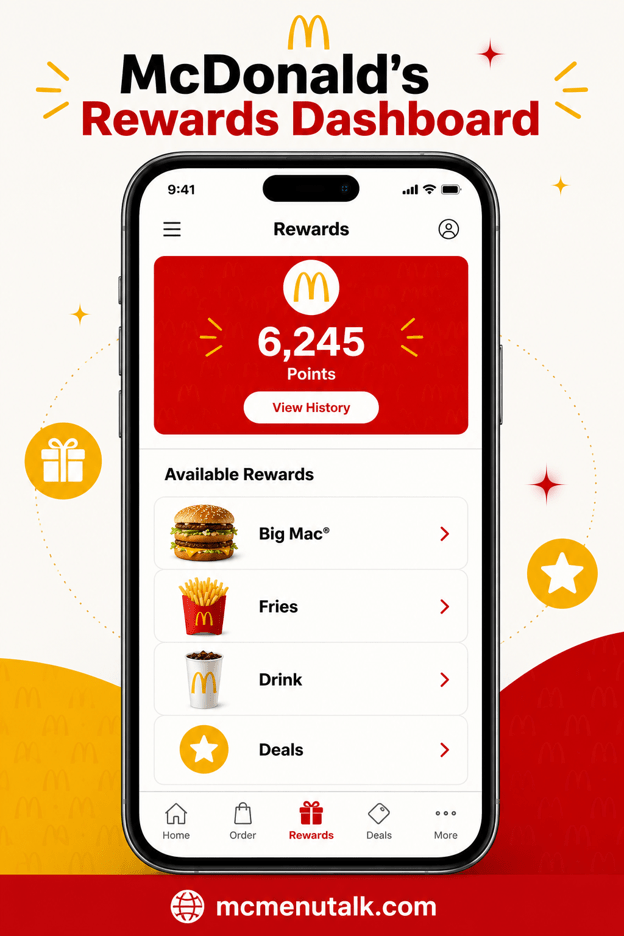
The app also shows:

  • Available rewards
  • Recent transactions
  • Points earned
  • Redeemed rewards
  • Promotional offers
How to Check Your McDonald's Rewards Points Balance

What You Can See in the Rewards Dashboard

What You Can See in the Rewards Dashboard
FeatureDescription
Current Points BalanceTotal available points
Available RewardsFree food ready to redeem
Reward HistoryPreviously redeemed rewards
Recent ActivityLatest purchases
Bonus OffersExtra point promotions

Do McDonald's Rewards Points Expire?

Yes. Rewards Points do not last forever.

If your account remains inactive or your points aren't redeemed within the applicable period, they may expire according to the program's terms and conditions.

For this reason, it's a good idea to check your Rewards balance regularly and use your points before they expire.


Rewards Expiration Overview

Rewards Expiration Overview
QuestionAnswer
Do Points Expire?Yes
Can Expired Points Be Restored?Usually No
Can I Check the Expiration Date?Yes, in the App
Do All Rewards Expire at the Same Time?Not Always
Should I Redeem Early?Recommended

Can You Transfer McDonald's Rewards Points?

Rewards Points are generally linked to your personal McDonald's account.

This means they typically cannot be transferred to another customer or combined with someone else's account.

Always review the latest program terms for any regional differences.


Rewards Account Rules

Rewards Account Rules
RuleDetails
Transfer PointsUsually Not Allowed
Share RewardsLimited
Merge AccountsNot Available
Multiple AccountsNot Recommended

Common McDonald's Rewards Problems

Most Rewards issues can be solved in just a few minutes.

Below are some of the most common problems customers experience.
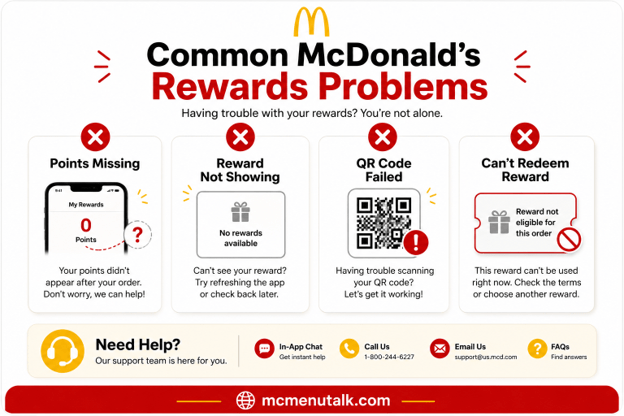
Common McDonald's Rewards Problems

Troubleshooting Guide

Troubleshooting Guide
ProblemPossible CauseSolution
Points Not ShowingOrder not processed yetWait a few minutes and refresh the app
Missing PointsQR code wasn't scannedContact McDonald's Support
Reward Won't ActivateReward not eligibleChoose another qualifying item
QR Code Won't ScanScreen brightness too lowIncrease brightness and try again
App Not LoadingTemporary issueRestart or update the app
Rewards MissingAccount issueSign out and sign back in
Can't Redeem RewardItem not eligibleReview reward conditions
Wrong Points BalanceSync delayRefresh the app later

Tips to Maximize Your Rewards

Smart customers get much more value from the Rewards program by planning how they earn and redeem points.

Instead of redeeming rewards as soon as possible, consider saving points for premium menu items that provide better overall value.


Best Practices

Best Practices
TipBenefit
Save points for premium burgersBetter value per reward
Watch for bonus point eventsEarn points faster
Check the app weeklyNew offers appear frequently
Order through the appAutomatically tracks eligible purchases
Redeem points before expirationPrevent losing rewards

McDonald's Rewards vs Coupons

Many customers wonder whether Rewards are better than coupons.

The answer depends on how often you visit McDonald's.

Coupons provide immediate savings, while Rewards encourage repeat purchases by letting you earn points over time.


Rewards vs Coupons
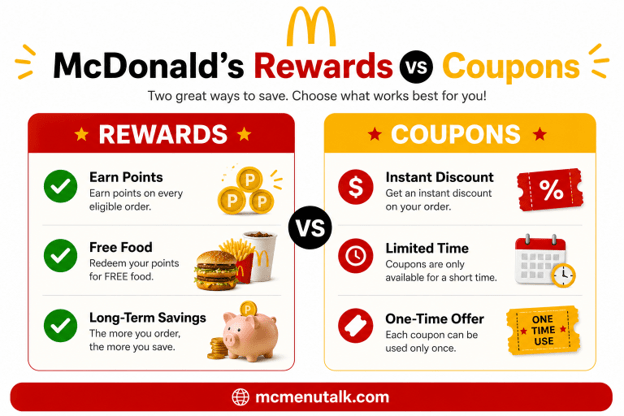
McDonald's Rewards vs Coupons
Rewards vs Coupons
McDonald's RewardsCoupons
Earn points with purchasesInstant discount
Redeem for free foodLimited time offers
Requires Rewards accountMay not require an account
Long-term savingsImmediate savings
Best for regular customersBest for occasional visits

McDonald's Rewards vs McDVoice Survey

Although both programs may help customers receive free food, they work very differently.

Rewards is a loyalty program that lets customers earn points through purchases, while McDVoice is a customer feedback survey that may provide a promotional validation code after completing a questionnaire.


Rewards vs McDVoice

Rewards vs McDVoice
McDonald's RewardsMcDVoice Survey
Earn PointsComplete Survey
Ongoing ProgramOne-Time Feedback
Requires AppRequires Receipt
Redeem PointsReceive Validation Code
Designed for Frequent CustomersDesigned to Collect Feedback

Frequently Asked Questions (FAQ)

What is McDonald's Rewards?
McDonald's Rewards is the official loyalty program that lets customers earn points on eligible purchases and redeem them for free food and drinks.
Is McDonald's Rewards free to join?
Yes. Joining the McDonald's Rewards program is completely free through the McDonald's App.
Do I need the McDonald's App to earn rewards?
In most locations, yes. You'll typically need the app and a registered Rewards account.
How do I earn McDonald's Rewards Points?
Earn points by placing eligible orders through the app or by scanning your Rewards code before completing your purchase.
How do I redeem my Rewards Points?
Open the Rewards section in the app, activate an available reward, and place an eligible order.
Can I earn points on every purchase?
Most eligible purchases qualify, but some exclusions may apply depending on local program rules.
Do McDonald's Rewards Points expire?
Yes. Points may expire after a period of inactivity or according to the program's terms.
Can I transfer my Rewards Points?
Generally, no. Points are linked to your personal Rewards account.
Can I combine Rewards with coupons?
Some offers may be combined, while others cannot. Check the offer terms before ordering.
Can I use Rewards in the Drive-Thru?
Yes. Most participating restaurants allow Rewards redemption at the Drive-Thru.
Can I redeem Rewards for delivery orders?
Availability depends on your region and delivery partner.
What happens if my points don't appear?
Wait a few minutes, refresh the app, or contact McDonald's Customer Support if the issue continues.
How can I check my Rewards balance?
Open the McDonald's App and view your current points on the Rewards dashboard.
Are Rewards available in every country?
No. Availability varies by country and participating restaurants.
Can I use multiple rewards in one order?
This depends on the terms of the Rewards program in your region.
What are the best items to redeem with Rewards?
Premium burgers like the Big Mac and Quarter Pounder with Cheese are often considered some of the best-value redemptions.
Can I earn points without scanning my Rewards code?
Usually no. Make sure your Rewards account is connected before completing your purchase.
Do promotional bonus points count toward my balance?
Yes, eligible bonus point promotions are typically added to your account automatically.
Is there a minimum purchase required to earn points?
This depends on the local Rewards program. Review the latest terms in the McDonald's App.
Can I delete my McDonald's Rewards account?
Yes. You can usually manage your account through the app settings or by contacting customer support.

McDonald's Rewards Quick Facts

McDonald's Rewards Quick Facts
CategoryInformation
Loyalty ProgramMcDonald's Rewards
App RequiredUsually Yes
Earn PointsYes
Redeem Free FoodYes
Rewards AvailableBurgers, Fries, Drinks, Desserts & More
Mobile OrderingSupported
Cost to JoinFree
Best ForFrequent McDonald's Customers
Back to top button